
MyEODev API — Connection Guide
Step-by-step guide for integrating with the MyEODev Fleet Telemetry API
Step-by-step guide for integrating with the MyEODev Fleet Telemetry API
The MyEODev API is a read-only REST API providing access to fleet telemetry data. Every request requires two credentials:
The Developer Portal lets you explore the API documentation, subscribe to products, obtain your keys, and test endpoints directly in the browser — no code needed.
Go to the Developer Portal at:
https://myeodev-apim.developer.azure-api.net
Click Sign up and fill in your details to create an account.
Open the confirmation email and click the verification link. Your account will then be activated and you can sign in to the portal.
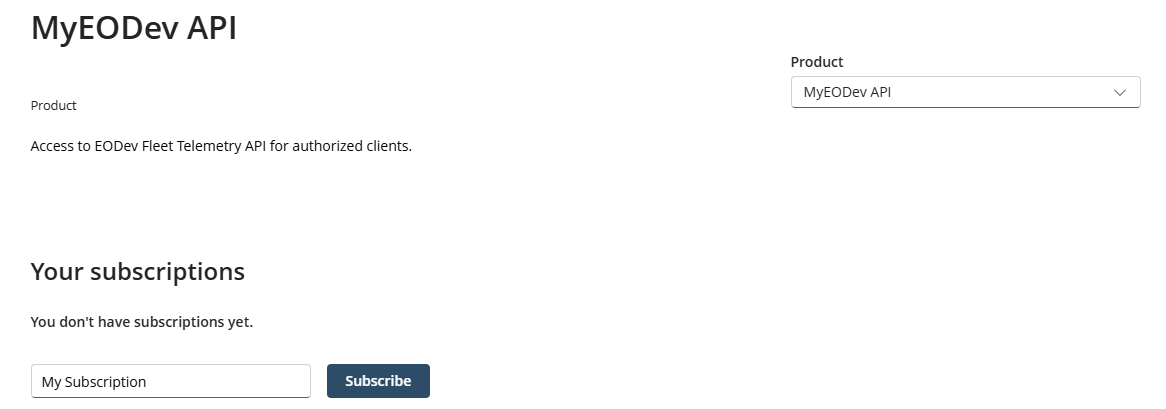
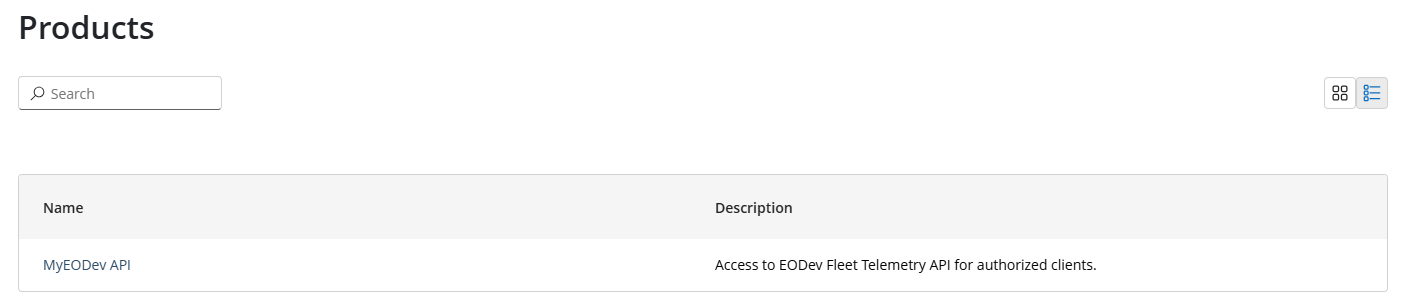
Subscription requests are reviewed by the EODev team. You will receive an email notification once your access has been approved. Your subscription status will change to Active.
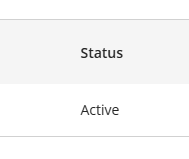
Once your subscription is active, your key is available in two places:
Copy the primary key — this is the value you will use as Ocp-Apim-Subscription-Key in your application.
Open the APIs section, select MyEODev API, pick any operation and go to the Try it tab. The subscription key and Bearer token are filled in automatically — just click Send.
You need four values to call the API from code. Two are public and fixed; two are private and issued by EODev:
| Variable | Value | How to obtain |
|---|---|---|
MYEODEV_API_URL |
https://myeodev-apim.azure-api.net |
Fixed — use as-is |
MYEODEV_TENANT_ID |
3e77969f-b79b-43c1-98ad-cfd990673f17 |
Fixed — use as-is |
MYEODEV_API_AUDIENCE |
api://0f87a3b6-476c-446e-8103-6c3cedad4788 |
Fixed — use as-is |
MYEODEV_SUBSCRIPTION_KEY |
your key | Developer Portal → Profile → click Show next to your subscription |
MYEODEV_CLIENT_ID |
your client ID | Provided by EODev on request |
MYEODEV_CLIENT_SECRET |
your secret | Provided by EODev on request. Expires after 12 months — contact EODev to renew before expiry. |
MYEODEV_SUBSCRIPTION_KEY, MYEODEV_CLIENT_ID, or MYEODEV_CLIENT_SECRET in your source code. Use environment variables or a secrets manager.client_secret expires after 12 months. When it expires, all API calls will return 401. Contact EODev in advance to request a renewed secret.Every request requires two headers. The Bearer token is short-lived (~1 hour) and must be refreshed automatically by your application:
| Header | Value |
|---|---|
Ocp-Apim-Subscription-Key |
Your subscription key from the Developer Portal |
Authorization |
Bearer <token> — obtained via client credentials flow (see below) |
Tokens are valid for ~1 hour. Your application should cache the token and refresh it proactively using the expires_in value returned by the token endpoint.
$body = @{
    client_id     = "YOUR_CLIENT_ID"
    client_secret = "YOUR_CLIENT_SECRET"
    scope         = "api://0f87a3b6-476c-446e-8103-6c3cedad4788/.default"
    grant_type    = "client_credentials"
}
$resp  = Invoke-RestMethod -Method POST `
    -Uri "https://login.microsoftonline.com/3e77969f-b79b-43c1-98ad-cfd990673f17/oauth2/v2.0/token" `
    -Body $body
$token = $resp.access_token
curl -X POST \
  "https://login.microsoftonline.com/3e77969f-b79b-43c1-98ad-cfd990673f17/oauth2/v2.0/token" \
  -d "client_id=YOUR_CLIENT_ID" \
  -d "client_secret=YOUR_CLIENT_SECRET" \
  -d "scope=api://0f87a3b6-476c-446e-8103-6c3cedad4788/.default" \
  -d "grant_type=client_credentials"
$base = "https://myeodev-apim.azure-api.net"
$h    = @{
    Authorization               = "Bearer $token"
    "Ocp-Apim-Subscription-Key" = "YOUR_SUBSCRIPTION_KEY"
}
BASE="https://myeodev-apim.azure-api.net"
TOKEN="<access_token from step 1>"
KEY="YOUR_SUBSCRIPTION_KEY"
Invoke-RestMethod "$base/v1/assets" -Headers $h
curl -s "$BASE/v1/assets" \
  -H "Authorization: Bearer $TOKEN" \
  -H "Ocp-Apim-Subscription-Key: $KEY"
Invoke-RestMethod "$base/v1/telemetry/catalog" -Headers $h
curl -s "$BASE/v1/telemetry/catalog" \
  -H "Authorization: Bearer $TOKEN" \
  -H "Ocp-Apim-Subscription-Key: $KEY"
Invoke-RestMethod "$base/v1/telemetry/last?asset_serial_nbr=0701012400001&series_id=7_1157" -Headers $h
curl -s "$BASE/v1/telemetry/last?asset_serial_nbr=0701012400001&series_id=7_1157" \
  -H "Authorization: Bearer $TOKEN" \
  -H "Ocp-Apim-Subscription-Key: $KEY"
The API exposes five endpoints. Two are reference endpoints you consult once to understand what you have access to and what signals exist — they are not part of your integration's runtime loop. The other three are the data endpoints you call in your application.
Reference endpoint. Returns the list of assets your account is authorized to access, with commissioning, warranty, and last known coordinate information. Use asset_serial_nbr from this response in all telemetry endpoints.
| Header | Description |
|---|---|
Ocp-Apim-Subscription-Key | Subscription key from the Developer Portal |
Authorization | Bearer <token> — obtained via client credentials flow |
[
  {
    "asset_serial_nbr":     "0701012400001",
    "product_type_code":    "0701",
    "customer_fleet_id":    "BESSTIE 7.01",
    "commissioning_dt":     "2026-01-01T00:00:00",
    "warranty_starting_dt": "2026-01-01T00:00:00",
    "warranty_hours":       null,
    "altitude":             20,
    "latitude":             48.6468,
    "longitude":            2.2764
  },
  {
    "asset_serial_nbr":     "0103012300071",
    "product_type_code":    "0103",
    "customer_fleet_id":    "GEH2 3.01",
    "commissioning_dt":     "2025-06-15T00:00:00",
    "warranty_starting_dt": "2025-06-15T00:00:00",
    "warranty_hours":       5000,
    "altitude":             0,
    "latitude":             48.6465,
    "longitude":            2.2764
  }
]
[], your account has not been granted access to any asset yet. Contact EODev to request access.Reference endpoint — data dictionary. Returns the complete list of telemetry signals available in the API, with their human-readable name, unit, optional value mapping, and the series_id identifier to use in data queries. This is documentation you consult to understand what signals exist — it is not a call your integration needs to make at runtime.
[
  {
    "product_id":   7,
    "product_name": "BESS",
    "series_id":    "7_1903",
    "name":         "BESS Mode PTC/MIC",
    "unit":         "",
    "uid":          "070104A3052702",
    "mapping":      "0=\"MIC\", 1=\"PTC\""
  },
  {
    "product_id":   7,
    "product_name": "BESS",
    "series_id":    "7_1310",
    "name":         "BESS Power",
    "unit":         "kW",
    "uid":          "...",
    "mapping":      ""
  },
  ...
]
series_id, understand the unit of each signal, and decode enumerated values from mapping when present.Returns the most recent value recorded for a given asset and telemetry series. Designed for live dashboards and current-state checks. Average data latency is ~1 minute 30 seconds (versus ~15 minutes for /stats and /history).
404 No data found. Use /v1/telemetry/history to retrieve older data.| Parameter | Required | Description |
|---|---|---|
asset_serial_nbr | Yes | Asset identifier (from /v1/assets) |
series_id | No | Telemetry signal identifier (from /v1/telemetry/catalog). If omitted, returns all signals. |
series_id is provided):
{
  "asset_serial_nbr": "0701012400001",
  "series_id":        "7_1157",
  "timestamp":        "2026-05-11T12:23:23",
  "value":            72
}
Response 200 — all signals (when series_id is omitted):
[
  { "asset_serial_nbr": "0701012400001", "series_id": "7_1157", "timestamp": "2026-05-11T12:23:23", "value": 72 },
  { "asset_serial_nbr": "0701012400001", "series_id": "7_1310", "timestamp": "2026-05-11T12:23:23", "value": -12.5 },
  ...
]
Returns aggregated statistics (min, max, mean, count, last value) for a telemetry series over a time range. Queries the full historical data store — suitable for any time range, including data older than 24 hours.
/v1/telemetry/last. Use /last for real-time current state; use /stats for analysis over a period.404 on the first request after a long idle period (cold start). Wait a few seconds and retry — subsequent calls will succeed normally.| Parameter | Required | Description |
|---|---|---|
asset_serial_nbr | Yes | Asset identifier (from /v1/assets) |
series_id | Yes | Telemetry signal identifier (from /v1/telemetry/catalog) |
from | Yes | Start datetime ISO 8601 (e.g. 2025-01-01T00:00:00) |
to | Yes | End datetime ISO 8601 |
{
  "asset_serial_nbr": "0701012400001",
  "series_id":        "7_1157",
  "min":              0,
  "max":              94,
  "mean":             79.74,
  "sample_count":     733,
  "last":             71,
  "last_ts":          "2026-05-11T15:23:30"
}
Returns the full time series (timestamp + value) for a telemetry series, ordered by time ascending. Queries the full historical data store — suitable for charting or bulk export over any time range.
/stats. Historical data may be available with a short delay (~15 min) compared to /v1/telemetry/last. On first request after a long idle period, a 404 cold-start response is possible — retry after a few seconds.| Parameter | Required | Description |
|---|---|---|
asset_serial_nbr | Yes | Asset identifier (from /v1/assets) |
series_id | Yes | Telemetry signal identifier (from /v1/telemetry/catalog) |
from | Yes | Start datetime ISO 8601 (e.g. 2025-01-01T00:00:00) |
to | Yes | End datetime ISO 8601 |
[
  { "timestamp": "2026-05-11T08:51:30", "value": 94 },
  { "timestamp": "2026-05-11T08:52:00", "value": 94 },
  { "timestamp": "2026-05-11T08:52:30", "value": 94 },
  ...
  { "timestamp": "2026-05-11T15:23:30", "value": 71 }
]
| HTTP Status | Meaning | Typical cause |
|---|---|---|
400 Bad Request |
Missing required parameter | asset_serial_nbr or series_id is absent from the query string |
401 Unauthorized |
Invalid or missing token | The Bearer token is absent, expired, or was obtained with the wrong credentials. Also check that the subscription key is present. |
403 Forbidden |
Access denied | Your account does not have access to the requested asset. Contact EODev if you believe this is incorrect. |
404 Not Found |
No data found | No telemetry data matches the provided parameters. For /last, this typically means the asset has not transmitted data in the past 24 hours (powered off or disconnected). |
429 Too Many Requests |
Rate limit exceeded | Your subscription has exceeded the allowed request quota — wait and retry |
500 Internal Server Error |
Backend error | Unexpected error on the server side — contact the API team if the problem persists |
All error responses include a JSON body:
{ "error": "Access denied for this asset" }
error field in the response body for a human-readable message, especially for 403 and 400 errors. MyEODev API — Developer Guide · v1 · May 2026